
QTranslate: Quick Translator6.4.2 - Google Play
You'll be able to see results in few seconds.
Publisher Description
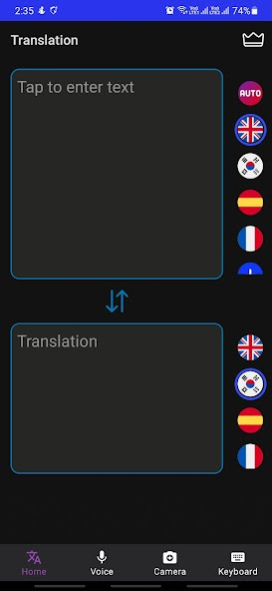
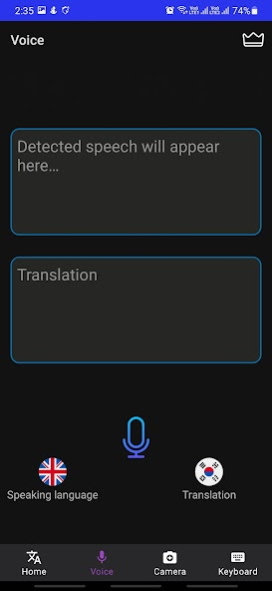
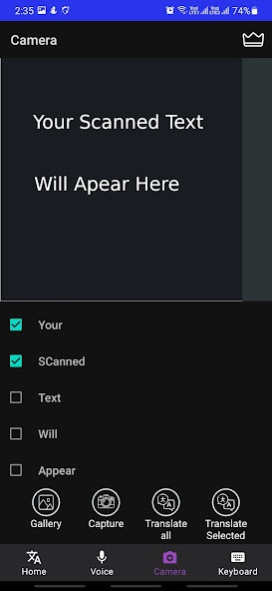
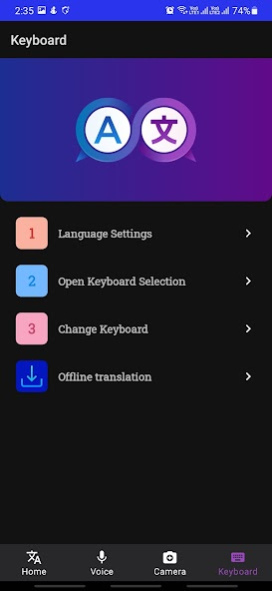
QTranslate (QT) is a Lightweight translator for Android. It is a simple and intuitive translation app that helps you translate text to text, text in photos, and your chats in social media apps.
Keyboard translator - Chat
Download QTranslate Keyboard and start translating text in over 100 languages. Easy and fast translations in all your favorite apps allow you to stay in contact with friends and colleagues all over the world!
Translate in Travel
Whether you’re traveling, on a business trip or in your home town, sometimes we need to communicate with somebody who doesn’t speak our language. Just take a photo of an object or text you want to translate. You could be ordering food, asking for directions, or talking to a business client – whoever you’re talking to, clear communication is essential!
Instant translation in 59 languages
Instant translations with the all-new QTranslate Keyboard: Translate text in any app instantly and stay in touch with your friends, family, and colleagues all over the world.
QTranslate supports 59 widely used languages for text and photo translations.
Features:
Contains a multi-language translator keyboard.
Translate websites, conversations, chats, screenshots, and images.
Keyboard extension.
Live chat translator.
Translate screenshots.
Text recognition.
Translate conversations in social media apps.
Translate copied texts.
Travel translator.
Tap, copy, translate.
Works with your favorite messengers, social networks, and email.
Detect languages automatically.
Download languages for offline use for when you travel without an internet connection
Scan or upload images and handwritings to translate
Live translation of conversations on keyboard: choose source and target languages and communicate easily in any language.
Other features:
1- Support OCR - Text recognition function. Take a photo to turn the image into text!
2- Offline translation in travel
3- Type to translate into 59 languages
4- Automatic language detection
5- Translate 59 languages inside the keyboard without opening the app
6- for online and offline use
Express exactly what’s on your mind without worrying about language barriers - directly from your keyboard. The QTranslate Keyboard gives you instant translations with ease in any of your favorite messaging apps, e.g. WhatsApp, Telegram, or Facebook Messenger, or directly translate in any Email app.
Supported languages & dialects for translation:
Afrikaans, Albanian, Arabic, Armenian, Azerbaijani, Basque, Belarusian, Bengali, Bosnian, Bulgarian, Catalan, Cebuano, Chichewa, Chinese (Simplified), Chinese (Traditional), Croatian, Czech, Danish, Dutch, English, Esperanto, Estonian, Filipino, Finnish, French, Galician, Georgian, German, Greek, Gujarati, Haitian Creole, Hausa, Hebrew, Hindi, Hmong, Hungarian, Icelandic, Igbo, Indonesian, Irish, Italian, Japanese, Javanese, Kannada, Kazakh, Khmer, Korean, Lao, Latin, Latvian, Lithuanian, Macedonian, Malagasy, Malay, Malayalam, Maltese, Maori, Marathi, Mongolian, Myanmar (Burmese), Nepali, Norwegian, Persian, Polish, Portuguese, Punjabi, Romanian, Russian, Serbian, Sesotho, Sinhala, Slovak, Slovenian, Somali, Spanish, Sundanese, Swahili, Swedish, Tajik, Tamil, Telugu, Thai, Turkish, Ukrainian, Urdu, Uzbek, Vietnamese, Welsh, Yiddish, Yoruba, Zulu
Terms of Service:
https://diakobits.github.io/qtranslate_terms.html
Privacy Policy:
https://diakobits.github.io/qtranslate.html
About QTranslate: Quick Translator
The company that develops QTranslate: Quick Translator is trinitytech.com.tr. The latest version released by its developer is 6.4.2.
To install QTranslate: Quick Translator on your Android device, just click the green Continue To App button above to start the installation process. The app is listed on our website since 2021-10-13 and was downloaded 0 times. We have already checked if the download link is safe, however for your own protection we recommend that you scan the downloaded app with your antivirus. Your antivirus may detect the QTranslate: Quick Translator as malware as malware if the download link to com.trinitytech.qtranslate is broken.
How to install QTranslate: Quick Translator on your Android device:
- Click on the Continue To App button on our website. This will redirect you to Google Play.
- Once the QTranslate: Quick Translator is shown in the Google Play listing of your Android device, you can start its download and installation. Tap on the Install button located below the search bar and to the right of the app icon.
- A pop-up window with the permissions required by QTranslate: Quick Translator will be shown. Click on Accept to continue the process.
- QTranslate: Quick Translator will be downloaded onto your device, displaying a progress. Once the download completes, the installation will start and you'll get a notification after the installation is finished.
Program Details
System requirements
Download information
Pricing
Version History
version 6.4.2
posted on 2021-10-13
Adding keyboard shortcut to notification bar
Disclaimer
Official Google Play Link
We do not host QTranslate: Quick Translator on our servers. We did not scan it for viruses, adware, spyware or other type of malware. This app is hosted by Google and passed their terms and conditions to be listed there. We recommend caution when installing it.
The Google Play link for QTranslate: Quick Translator is provided to you by apps112.com without any warranties, representations or guarantees of any kind, so access it at your own risk.
If you have questions regarding this particular app contact the publisher directly. For questions about the functionalities of apps112.com contact us.
